48Hours Digital
Back to More
Portrait Collage AI Image Prompt - Trending - 48hoursdigital.com
Views: 96
03 Sep 2026

This image Prompt Text

Birthday poster design: three-panel layered composition. Center top panel shows a young man with wavy shoulder-length hair and white beanie, warm smile, wearing a grey blazer over white tee. Bottom center panel shows the same man in a tan buttoned overshirt with layered necklace, smiling to the side. Left and right side panels show mirrored grayscale duotone repeats of his smiling profile at a slight diagonal crop. Text overlay at bottom: "HAPPY BIRTHDAY" in bold white sans-serif, name in elegant green script font below it. Studio-name watermark small in top corner. Clean graphic collage poster design, soft grayscale-to-color transition, fan-edit aesthetic.
✨ Interactive tool

Customize This Image Prompt

Choose your preferred image settings. Your original prompt stays unchanged.

Detecting prompt type…

Actual resolution depends on the image generator.

The selected settings are added as instructions. Some generators may ignore unsupported options such as exact resolution or aspect ratio.

How to Use This AI Image Prompt

Use this prompt as a starting point. Results may vary by image generator, settings, and reference images.

  1. Choose an AI image generator suitable for the image you want to create.
  2. Click Copy Prompt above and paste the text into the generator.
  3. If supported, add a reference image when it helps communicate your intended result.
  4. Customize the subject, background, clothing, colours, mood, or other details.
  5. Generate the image. If needed, adjust a few details and try another variation.

Suggested tool: ChatGPT. Check that it supports the features you need.

Customization Tips

Personalize the prompt to match your idea. Keep its main concept and change only the details you need.

Subject

Describe exactly who or what should appear.

Background

Choose a location, environment, or backdrop.

Style and mood

Set the visual style, atmosphere, and colour palette.

Lighting and composition

Adjust lighting, camera angle, framing, and subject placement.

Image format

Select square, portrait, or landscape if the tool offers aspect-ratio settings.

Unwanted details

Use negative prompts if supported to exclude unwanted objects or visual defects.

Example: Customize a Portrait Prompt

For a portrait, you might choose these details:

Subject: a young musician

Background: a warmly lit recording studio

Style: realistic editorial photography

Lighting: soft window light

Composition: waist-up portrait, subject in sharp focus

Illustrative example only. Adapt these details to the actual prompt and your image generator.

Tips for Better Results

  • Use clear, specific descriptions instead of unrelated keywords.
  • Follow the generator's prompt limits, settings, and usage rules.
  • Try a few variations because AI results are not always identical.
  • Review the generated image before publishing or using it commercially.
Recommended Generator:
⚡ ChatGPT

Related Image Prompts

View All →
Related AI Prompt
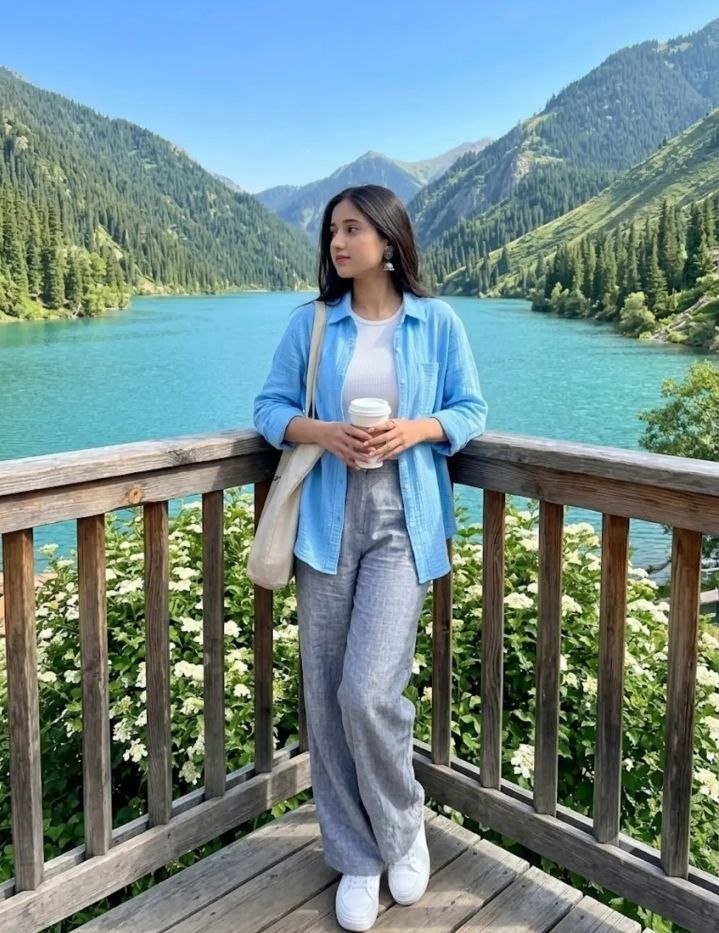
A stylish young woman is leaning against a wooden balcony railing, holding a disposable coffee cup. She a sky blue button-down shirt over a white top, grey wide-leg trousers, and white sneakers. She has a beige canvas tote bag over her shoulder and is looking away from the camera. The background shows a large turquoise lake surrounded by green mountains and pine trees under a clear blue sky. White flowering bushes line the balcony. Natural, sunny daylight.
View Prompt
Related AI Prompt
Use the uploaded photo as the ONLY identity and face reference for the person. STRICT FACE IDENTITY LOCK — HIGHEST PRIORITY. The person's facial identity must remain clearly recognizable and consistent with the uploaded photo. Do NOT change, replace, regenerate, beautify, or reinterpret the face. Preserve the person's natural face shape, eyes, eyebrows, nose, lips, jawline, cheekbones, forehead, skin tone, skin texture, and natural facial details. No face swap, no AI beauty filter, no excessive skin smoothing, and no changes to facial proportions. The final person must look like the SAME REAL PERSON from the uploaded photo. Create an ultra-realistic full-body nighttime street fashion portrait of the person standing confidently beside a stylish black SUV parked on a lively city street. She is looking slightly to the side with a natural, elegant expression and a graceful pose. She is wearing a beautiful elegant black traditional outfit with a fitted black kurta or dress and a matching black dupatta draped naturally around her shoulders. Add elegant traditional statement earrings. Keep the outfit classy, realistic, and naturally fitted. The background shows a realistic busy street at night with soft streetlights, distant shops, vehicles, subtle pedestrians, and natural city details. The black SUV is clearly visible behind her, creating a luxurious yet realistic street-photography aesthetic. Warm street lighting softly illuminates the scene while maintaining natural skin tones and realistic shadows. Photography style: ultra-realistic professional photography, DSLR quality, natural skin texture, realistic hands and body proportions, detailed fabric, cinematic night lighting, authentic street atmosphere, soft background depth, high resolution, photorealistic, Pinterest-style fashion photography. IMPORTANT: FACE IDENTITY PRESERVATION IS THE HIGHEST PRIORITY. Do not copy the face from the reference scene or any other person. Only use the uploaded photo to preserve the person's unique identity. If any styling, pose, lighting, or background instruction conflicts with facial identity preservation, preserve the uploaded person's original identity first. 🚫 Negative Prompt different face, face swap, altered identity, AI-generated face, beautified face, excessive makeup, unrealistic skin, plastic skin, excessive smoothing, changed facial proportions, distorted face, deformed hands, extra fingers, unrealistic body proportions, blurry face, cartoon, painting, low quality, duplicate person 💡 Best result ke liye: Clear, front-facing aur good lighting wali photo upload karein. Isse AI ko person's facial features ko accurately preserve karne mein help milti hai.
View Prompt
Related AI Prompt
A highly detailed cinematic portrait of a handsome young South Asian man in his early 20s, sharp jawline, light stubble and a, thick black hair styled in a high voluminous quiff with faded sides. He is looking off to the side with a calm, confident expression, left hand raised near his chin in a thoughtful pose. He wears a short-sleeve maroon button-up shirt with bold white wavy abstract lines, a thin silver chain necklace, and a rose-gold metal wristwatch on his left wrist.
View Prompt
Related AI Prompt
The same woman holding them in her hands. The bottom frame is a close-up portrait of the same woman, her head thrown back, eyes closed, clutching the same bouquet of roses to her chest. In all frames, her hair falls over her face, obscuring part of it. The color palette is muted, with delicate colors. The overall style evokes romance. There is visible grain. Sunlight hits each frame. Each frame has a cinematic effect with added grain.
View Prompt